VRCHAT WORLD GIMMICK
ChronoSlate Manual
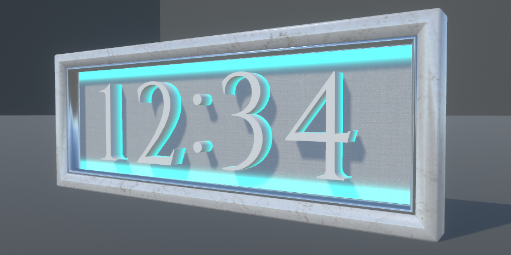
A three-dimensional clock gimmick for VRChat worlds.
Swap the bundled materials to match
the mood of your world.
It shows VRChat network time as hours and minutes.
Requirements
| Item | Version |
|---|---|
| Unity | 2022.3.22f1 |
| Poiyomi Toon Shader | 9.3.64 |
Please install Poiyomi Toon Shader before
using this data.
Poiyomi Toon is available through VCC / ALCOM / BOOTH.
Poiyomi Toon Shader https://www.poiyomi.com/
Gimmick data
| Polygons | max 3,268 / min 1,468 |
| Materials | 4 |
The polygon count is the total across the active meshes, at its highest and lowest.
The material count is for ChronoSlate.prefab.
License
Please read the terms of use below before using this data.
This data is licensed under the VN3 License.
| 日本語 | 規約全文 (JP) |
| English | Terms of Use (EN) |
| 한국어 | 이용규약 (KO) |
| 中文 | 使用条款 (ZH) |
These terms use the VN3 License template created by Hiroko Ashiyama (@hiroko_TB).
If any discrepancy arises between languages, the Japanese version prevails.
Setup
- Import the bundled unitypackage
(drag and drop it, or use Assets>Import Package>Custom Package)
The data unpacks to Assets/KinariYugijo/ChronoSlate. - Drag Assets/KinariYugijo/ChronoSlate/Prefabs/ChronoSlate.prefab into your scene hierarchy.
- Adjust the position, rotation and scale. If you are outside Japan, set your time zone in the next section.
Time zone
Set the time zone with Utc Offset Hours
on the ChronoSlate component of the ChronoSlate you placed.
Decimals and negative values are accepted.
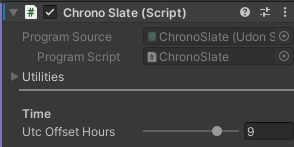
| Region | Value |
|---|---|
| Japan (JST) | 9 |
| UK (GMT) | 0 |
| US West Coast (PST) | -8 |
Placement
The default size is on the large side, so
use the Scale on the root Transform if you want it on a desk.
Customizing the look
The frame, the backplate and the digits can each be re-finished.
A range of materials is included, so try a few and find a look you like.
Which prefab to use
Prefabs with the look already set up are included.
| Prefab | What it is |
|---|---|
| ChronoSlate | The standard ChronoSlate |
| ChronoSlate_Picture | A picture-first ChronoSlate. You can put an image of your choice on the backplate |
| ChronoSlate_MiniTimer | A ChronoSlate laid out with the clock small in the lower right. Meant for decoration |
| ChronoSlate_NoBack | A ChronoSlate with no backplate. Suits a wall mount or a more restrained placement. |
Hiding the backplate
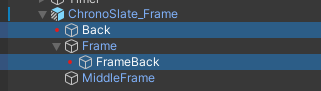
To hide the backplate yourself,
deactivate these GameObjects under ChronoSlate.
Putting your own image on the backplate
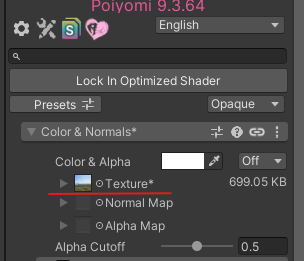
Replace the Texture on Materials/Back/ChronoSlate_Back_Picture01
to show any image you like.
Assign that material to the MeshRenderer on ChronoSlate>ChronoSlate_Frame>Back.
The ChronoSlate_Picture.prefab already uses this material,
so dropping that prefab in is enough to show an image.
Changing the digit material
1. Right-click ChronoSlate in the Hierarchy
2. Kinari-Yugijo>ChronoSlate>Bulk Change Digit Materials
3. Set any material in the window's New material field

Materials/Common — 25 shared finishes
Materials in this folder can be used on any part — frame, digits or backplate.
- Fabric01–06
- Glass01–02
- Glitter01
- Lava01
- Metal01–05
- Stone01–05
- Wood01–05
Materials/Back — 7 backplate finishes
Intended for the backplate.
- Emission01
- Emission02
- Emission03
- Emission04
- Emission05
- Emission06
- Picture01
Materials/Number — 5 digit finishes
Intended for the digits.
- Emission01
- Emission02
- Emission03
- Glass01
- White01
The glass finishes are expensive to render. Common_Glass01/Common_Glass02/Number_Glass01 use Poiyomi Toon Grab Pass. Pick another material if your world is tight on performance.
FAQ
The time is wrong
See the "Time zone" section.
Japan Standard Time is 9.
Everything is magenta
Poiyomi Toon may not be installed.
See the "Requirements" section.
Can it show seconds?
No. The display is four digits, fixed to hours:minutes.
Third-party assets
For the assets below, the VN3 restrictions do not apply and the CC0 license takes precedence.
Scope: the textures in the Textures/Common directory
Changelog
| Version | Date | Notes |
|---|---|---|
| v1.0.0 | 2026-08-23 | Initial release |